
How to Automate Your Email Marketing with Brevo
Email automation helps businesses save time, improve customer engagement, and build stronger relationships with their audience. Instead of manually sending emails to every subscriber, automated workflows allow you to deliver the right message at the right time based on customer actions and behaviors.
Whether you’re welcoming new subscribers, nurturing leads, or encouraging repeat purchases, Brevo provides the tools needed to automate communication and create a more efficient marketing process.
What Is Email Automation?
Email automation is the process of sending emails automatically when specific actions or conditions are met. These actions, often called triggers, can include subscribing to a newsletter, making a purchase, completing a form, or interacting with previous campaigns.
With automation in place, businesses can maintain consistent communication without manually managing every message.
Why Use Brevo for Email Automation?
Brevo offers a user-friendly automation builder that allows businesses to create customized workflows without technical expertise. By combining email marketing, CRM, customer segmentation, and automation tools in one platform, Brevo simplifies the process of managing customer journeys.
Key benefits include:
- Automated email workflows
- Customer segmentation
- CRM integration
- Personalized messaging
- Real-time reporting and analytics
- Scalable automation for growing businesses
6 Steps to Launch Your First Automation Workflow
1. Verify Your Sending Domain
Before launching automated campaigns, authenticate your domain to improve deliverability and help ensure emails reach subscribers’ inboxes.
2. Import and Organize Your Contacts
Upload your subscriber list and organize contacts using tags, segments, or custom attributes. Proper organization helps deliver more relevant messages.
3. Segment Your Audience
Group contacts based on interests, behaviors, purchase history, or engagement levels. Segmentation allows for more personalized communication and better campaign performance.
4. Create Your Email Template
Use Brevo’s drag-and-drop editor to design professional emails that reflect your brand and provide value to your audience.
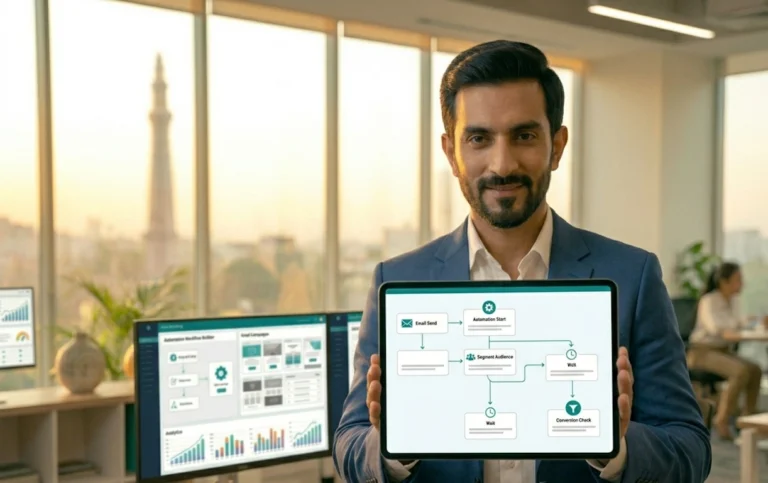
5. Build Your Automation Workflow
Create a workflow by selecting a trigger and defining the actions that follow. Common triggers include:
- New subscriber registrations
- Form submissions
- Product purchases
- Abandoned carts
- Customer milestones
6. Test and Activate Your Workflow
Before launching, review every step of the workflow, test email delivery, verify links, and ensure automation rules work as intended. Once everything is functioning correctly, activate the workflow and monitor performance.
Popular Email Automation Workflows
Welcome Series
Introduce new subscribers to your brand and provide valuable information immediately after they join your list.
Lead Nurturing Campaigns
Guide potential customers through the buying journey with educational content and targeted offers.
Abandoned Cart Recovery
Encourage shoppers to return and complete their purchase through automated reminders.
Post-Purchase Follow-Up
Strengthen customer relationships with onboarding content, recommendations, and feedback requests.
Re-Engagement Campaigns
Reconnect with inactive subscribers and encourage them to engage with your brand again.
Best Practices for Better Results
To maximize automation performance:
- Keep emails personalized and relevant
- Segment your audience effectively
- Use clear calls to action
- Optimize emails for mobile devices
- Monitor campaign performance regularly
- Continuously test and improve workflows
Benefits of Email Automation
Businesses using automation often experience:
- Improved efficiency
- Better customer engagement
- More consistent communication
- Increased conversion opportunities
- Stronger customer relationships
- Greater scalability
Automation allows marketing efforts to continue working even when your team is focused on other priorities.
Final Thoughts
Email automation is one of the most effective ways to create consistent customer experiences while reducing manual workload. With Brevo’s automation tools, businesses can build personalized journeys that nurture leads, improve engagement, and support long-term growth.
Starting with a simple workflow and gradually expanding your automation strategy can help create a more efficient marketing system that delivers measurable results over time.
Frequently Asked Questions
Is Brevo email automation available on the free plan?
Brevo offers automation features across various plans. Available functionality may vary depending on your subscription level.
What is the best automation workflow for beginners?
A welcome email series is often the easiest and most effective workflow to start with because it engages subscribers immediately after they join your list.
Can I track results from automated campaigns?
Yes. Brevo provides analytics and reporting tools that help monitor opens, clicks, engagement, and other performance metrics.
Do I need technical skills to create automations?
No. Brevo’s visual workflow builder is designed to help users create automated campaigns without coding knowledge.